


Allows system adminstrators to quickly import a file of common addresses into PS Pro Suite. The Common Address file must be formatted as follows to successfully import:
· Save as a CSV file
· Do NOT include a header row
· Include the following columns in the order specified below:
o Description – required (e.g. Target) and must be unique
o Street – optional (e.g. 100 E Main St)
§ If entering an intersection, the intersecting streets should be delineated within this column with a backslash (\) (e.g. Main St \ Smith Ave)
o City – optional (e.g. Jacobstown)
o State – optional (e.g. OK)
o Zip – optional (e.g. 12345)
NOTE: Columns B – E are listed as optional, but it is required to specify a value in at least one of columns B – E before the other columns are treated as optional. For example, a record entered as Description = Target, Street = 100 E Main, City = blank, State = blank, and Zip = blank would be sufficient to meet the file specifications.
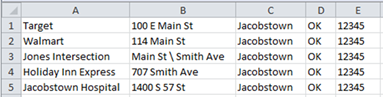
Once the CSV file is configured, then open PS Pro Suite and complete the following steps:
· System Admin > System > Common Addresses
· Select Import Common Addresses
· Locate the CSV file saved on the computer
NOTE: A printout has been added to the Common Addresses system admin window, and a Common Addresses main item has been added to the Report Generator.