


Required configuration step for the ani-ali interface.
· System Admin > System > Machine Settings
· Already configured Machine Settings will display in the list and can be edited by double clicking or deleted by highlighting blue and selecting delete on the keyboard
· Select New Machine Setting
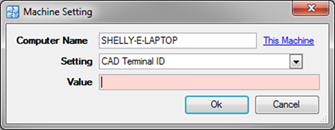
o Computer Name – Select the This Machine link which auto-completes the name of the computer
o Setting – Select CAD Terminal ID
o Value – Two options:
§ Name of the computer (use if any terminal can answer any type of call)
§ Name of the Ani-Ali ID (use if specific types of calls need to be answered at specific terminals)