


A CFS can be forwarded from one terminal to another by using the Terminal command on the Command Line. For example: one terminal answers every call, creates a new CFS and then forwards the CFS onto a different terminal so that person can add the call details. Terminals can also be used on recurring scheduled calls to determine where the CFS will be generated.
· System Admin > CAD > Terminals
· Already configured Terminals will display in the list and can be edited by double clicking or deleted by highlighting blue and selecting delete on the keyboard.
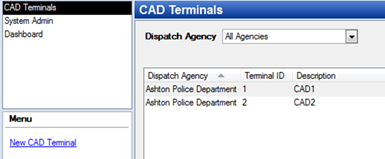
· Select New CAD Terminal
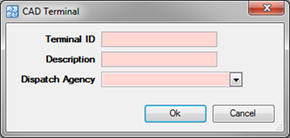
o Terminal ID – Identifies the terminal position
o Description – Name of the Terminal
o Dispatch Agency – If the agency has multiple dispatch agencies, then can select between the choices.