


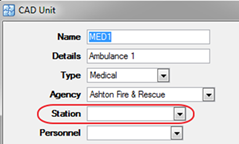
Stations can be used to describe the location of specific units that work for an Agency. For example, Truck A is located at Fire Station 1 and Truck B is located at Fire Station 2 and both trucks are a part of the City Fire Department Agency. The stations can be used to configure run cards for Unit Recommendation, CAD units, Unit Locations, Unit Routing and can also be set up to send a fax of the Rip & Run to the specific station after a CFS is completed. If using Mapping, then the Station can be connected to a Unit Location & Common Address so that the station location plotted on the map. If using AVL, then it allows configuration of which agency/unit status combinations should show up on the map.
Please reference the CFS Rip and Run Report section of this manual for further information about how to send fax and print CFS rip and run reports.
· System Admin > CAD > Stations
· Already configured Stations will display in the list and can be edited by double clicking or deleted by highlighting blue and selecting delete on the keyboard.
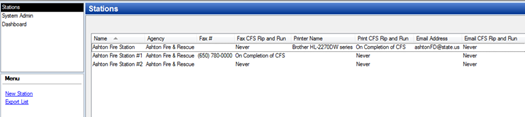
· Select New Station
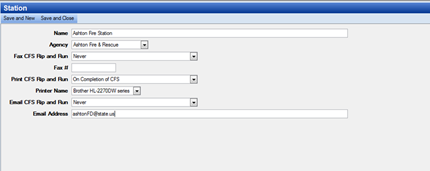
o Name – Station Name
o Agency – The agency related to the station
o Fax CFS Rip and Run – Never, On assignment of First Unit, On Completion of CFS or On Assignment of First Unit and On Completion of CFS.
o Fax # - Format: (605) 484-9858
o Print CFS Rip and Run – Never, On assignment of First Unit, On Completion of CFS or On Assignment of First Unit and On Completion of CFS
o Printer Name – Select the name of the printer which was set up in the System section of System Admin.
o Email Address – Type the email address associated with the Station.