


PS Pro CAD interfaces with ProQA Paramount for police, fire, and medical. This interface has received Platinum Certification. When the interface is enabled:
● ProQA cases can be launched directly from CAD for all ProQA disciplines (police, fire, and medical)
● The right-hand side of the CFS Window includes key ProQA data.
● All ProQA return data is entered in the CAD Command Log. Additional filters in the command log allow filtering for ProQA information.
● The Names tab and Vehicles tab on the CFS window include ProQA sections that log names and vehicles added from ProQA. These names and vehicles can then be turned into global names if desired.
● CAD recognizes when ProQA suggests a revised Incident Code and will auto-update the incident code to match ProQA.
● Paging message tags have been included ({proqa_4_commandments}, {proqa_chiefcomplainttext}, and {proqa_summary}) to place ProQA data into pages sent to responders.
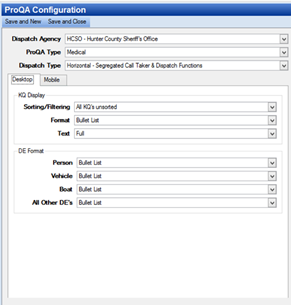
Basic display settings for ProQA data in CAD can be configured in System Admin > CAD > ProQA Configuration.
● Revise your paging templates as needed to include ProQA data.
● The KQ Display and DE Format may be differentiated from Desktop to Mobile versions of PS Pro Suite using the tabs above the fields.
Contact CentralSquare Technologies if you are interested in purchasing the ProQA interface. CentralSquare Technologies staff will assist in setting up this interface.
Note: In order to use this interface, you will need version 5.1 or higher of ProQA and version 11.1 or higher of PS Pro Suite.