


Recurring Scheduled Calls creates a new CFS at a specific day and time based on your agency’s needs such as daily siren tests.
1. Navigate to System Admin > CAD > Recurring Scheduled Calls. Already configured Recurring Scheduled Calls will display in the list and can be edited by double-clicking or deleted by highlighting blue and selecting Delete on the keyboard.
2. Select New Recurring Scheduled Call.
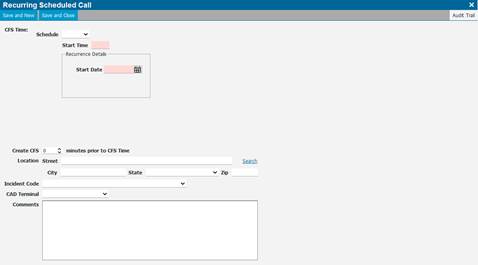
● CFS Time: Schedule.
● Minute: allows for creating a CFS every specified number of minutes.
● Daily: allows for creating a a CFS every specified number of days at the same time each day.
● Weekly: allows for creating a CFS every specified day each week at the same time each day.
● Monthly: allows for creating a CFS on the same days every month at the same time each day
● Create CFS – When the CFS is created, recommended to create a couple minutes prior to the CFS time so it does not get overlooked.
● Location – CFS Location.
● Incident Code – Provide an incident code if needed.
● CAD Terminal – Ability to assign to specific terminal (if needed).
● Ready For Dispatch - if using this feature, this will flag the call that it is ready for dispatch instead of the Call Taker.
● Comments – Provide if necessary.
3. Select Save and Close when finished or Save and New to enter another scheduled call.