


A rule can be configured so that CAD automatically runs queries when a name or vehicle is added to a CFS on the Name and Vehicle tabs and attaches the returns to the CFS. For example, you might configure your system to attempt to run a Driver's License Query by OLN, and if not enough information is available, to then attempt to run a Driver's License Query by Name.
1. Navigate to System Admin > CAD > NCIC Automation. Already configured NCIC Automation rules will display in the list and can be edited by double-clicking or deleted by highlighting blue and selecting Delete on the keyboard.
● Rules for Names are at the top of the window.
● Rules for Vehicles are the bottom of the window.
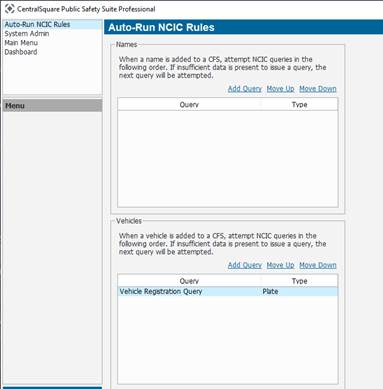
2. Select Add Query.
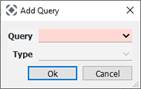
● Query: Driver’s License Query, Driver Query or Vehicle Registration Query.
● Type: Name, OLN, Plate or Type.