


A Map Marker Type is the icon for a specific marker on the map.
1. Navigate to System Admin > CAD > Map Marker Types. Already configured Map Marker Types will display in the list and can be edited by double-clicking or deleted by highlighting blue and selecting Delete on the keyboard.
2. Select New Map Marker Type.
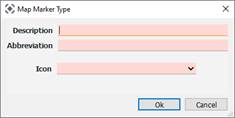
● Description: Name of map marker
● Abbreviation: Abbreviation
● Icon: Picture shown when the map marker is created on the map