


1. Select Edit Columns on the top right side of the filter window.

Use the check boxes to select the columns that you wish to see displayed and use the Move Up and Move Down options to select the order in which they appear on your filter from left to right.
Note: This is where selections like displaying Last Status Change Time, Incident Code, and Location are made.
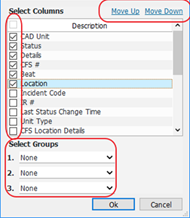
2. Select from the 3 dropdowns at the bottom of the Dialog box to indicate any groups you wish your filter to display.