


This will create a command that will use the command line to add a name to a specified CFS.
1. From the CAD Command window select New CAD Command in the Menu.
2. Enter the Command description (this will be what displays on the command drop-down in the Command Line).
3. Enter the Description.
4. Enter the Menu Title.
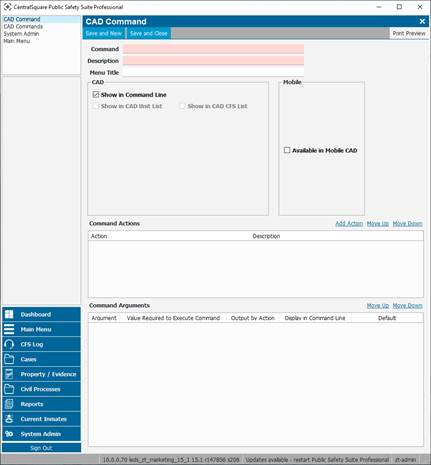
5. Select Available in Mobile CAD if this command will be available in PS Pro Mobile. In addition.
6. Add the Button Title and the list of agencies that can use this command.
7. Select Add Action and choose from the list Add CFS Name.
8. In the Command Argument section at the bottom, double-click on each line and choose to display or not display each argument on the command line.
9. Once you have selected the specifics for your command arguments select Save and Close at the top of the window.
Note: A restart of PS Pro Suite will be required for this command to be available per machine.