


Bulletin Alerts may be configured to generate automated bulletin notifications to your active mobile CAD units. These bulletins may be triggered by any of the following: NCIC Hits, Name Alerts, Location Alerts, or Vehicle Alerts.
1. Navigate to System Admin and select Bulletin Alerts from the CAD section.
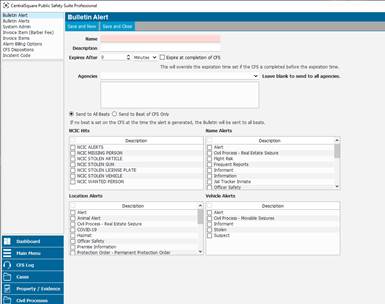
2. To configure an alert, select New Bulletin Alert.
It is recommended that you name and describe each of the bulletin alerts after the alert they will represent. An expiration date may be set for a specified period of time. Checking the Expire at completion of CFS check box will close the bulletin when the call is completed regardless of the time specified.
3. Specify which system agencies will be notified of the bulletin. Leaving the agency block blank will send it to all system agencies. Based on the location of the CFS you may also determine if the bulletin will be sent to all beats or specify it to responders working in the beat where the call took place.
4. Check the boxes of the alert types you would like to include for this type of bulletin.
● NCIC Hits
● Name Alerts
● Location Alerts
● Vehicle Alerts
You may also determine the frequency of bulletin alerts.
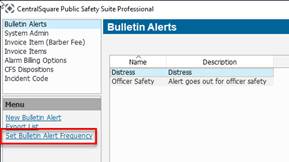
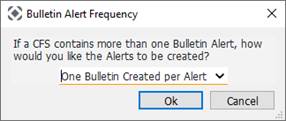
1. From the bulletin alerts log select Set Bulletin Alert Frequency. The options include:
● One Bulletin Created per Alert
● One Bulletin Created per CFS
If more than one alert occurs during a CFS, this option will only create a bulletin alert for the first alert.
Once the alert types are configured, they will be a bulletin will be triggered anytime a specified alert type or NCIC hit is placed on a CFS. See the Example below:
● Name is entered onto a CFS with multiple name alerts
● The bulletin alert is automatically generated and each mobile officer on duty will receive a New Bulletin notification. Selectable links of each alert type as well as the name card will be located within the body of the bulletin
Note: Bulletin notifications are ultimately determined by the notification settings set to each personnel. Please review each of your responder’s notification settings if bulletin notification need to be altered.
2. To adjust notification settings, navigate to System Admin > System > Notification Settings.
3. Also validate each personnel’s notification settings at System Admin > Personnel > Personnel.
4. Open a personnel record and select Sign In Credentials.
5. Use the Notification Settings drop-down list to adjust the user’s notification settings.