


A Beat is a territory patrolled by an officer or deputy. The beat can be assigned to a specific unit and/or to a CFS.

1. Navigate to System Admin > CAD > Beats. Already configured beats will display in the list and can be edited by double-clicking or deleted by highlighting blue and selecting Delete on the keyboard.
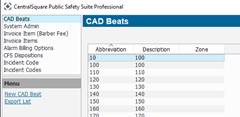
2. Select New CAD Beat.
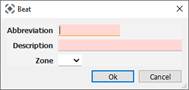
● Abbreviation: Shows up before the description on the CFS window.
● Description: Name of Beat.
● Zone: A larger territory that the beat resides within.
3. To configure the Zone drop-down which is the same Zone field used in the Cases module, Select F11 or go to System Admin > System > Dropdown Box Items Standard > Case Zones.