


Beat Plans control which beats can be accessed on the Beat field on the CFS window. Beat Plans can be set by the dispatcher on the CFS Log window.
1. Navigate to System Admin > CAD > Beat Plans. Already configured beat plans will display in the list and can be edited by double-clicking or deleted by highlighting blue and selecting Delete on the keyboard.
2. Select New Beat Plan.
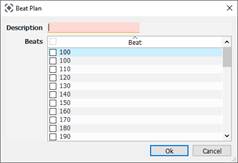
● Description: Name of Beat Plan.
● Check the beats to include in the plan.