


· Create a new command in System Admin > CAD > Commands
o WARN: it is always recommended to create commands first on your training server
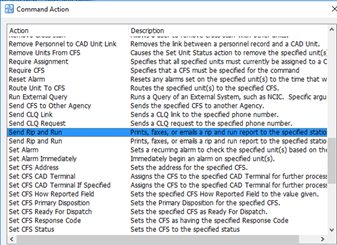
· Select Send Rip and Run for the command action
· Double click on both of the lines displayed in the Command Arguments section and changed them to "Yes"
o This will allow users to select the Station they are sending the Rip and Run to. Leaving it listed as "No" will require the agency to select a default station to always send the rip and run to.
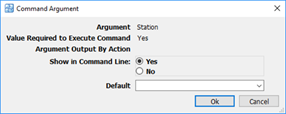
· Once both of the Command Arguments have been configured save the command.
o Note: a restart of PS Pro Suite will be required before this command is functional.
· Selecting the Command on the Command Line should display lines for the Station and the CFS number to relate to.
