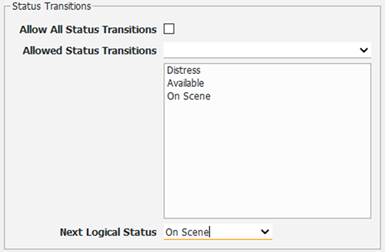
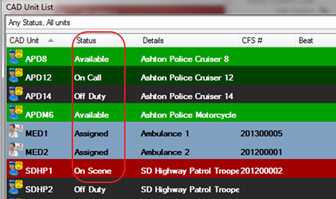
CAD Unit Statuses define the status of a unit i.e. available, on scene, off duty, assigned etc.
NOTE: Once a new unit status is created, then a new command must be created too. Please reference the Command section of the CAD & Mapping manual.
· System Admin > CAD > Unit Statuses
· Already configured CAD Unit Statuses will display in the list and can be edited by double clicking.
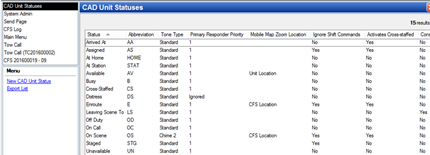
· Select New CAD Unit Status
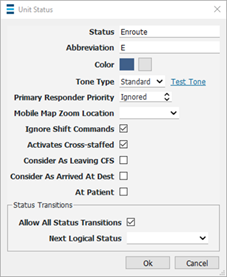
o Status – Name of status
o Abbreviation – Abbreviation of status
o Color – Color shown on the CAD Unit Window
o Tone Type - choose the tone that will play
o Primary Responder Priority – Determines which status automatically creates an incident report and is also based on the CFS incident code.
o Mobile Map Zoom Location - You are able to choose if you would like the map to zoom to the Unit Location or CFS Location when this status is set for a CAD Unit.
o Ignore Shift Commands – If checked, then the shift command status will not have the ability to change the unit’s status.
o Activates Cross-Staffed – If checked then when two or more units are designated as cross-staffed and one of the cross-staffed units is set to the status, then the other units are set to a cross-staffed status and cannot be assigned.
§ e.g. a fire department cross-staffs two engines because when one engine is dispatched to a call, then the other engine is set to cross-staffed because there is not enough staff to run the second engine.
o Status Transitions - If unchecked this will allow a system administrator to create a expected status order for CFS, if an 'incorrect' status is selected the system will display a notification. This feature helps prevent accidentally assigning the wrong units to a CFS.
§ Allow All Status Transitions - If checked, this option will allow any unit to move from the indicated status to any other status in the system (i.e Available, Enroute, On Scene, ect).
§ Next Logical Status - If the Allow All Status Transition is unchecked, specific commands will be indicated in the dropdown box to identify which commands should be used next. The system will never entirely prevent you from completing a status change but it will prompt an override message if the next status is not listed.