


Paging message types define a specific paging message and automatically fill in the page’s subject and message field with default information.
1. Navigate to System Admin > CAD > Paging Message Types. Already configured Paging Message Types will display in the list and can be edited by double-clicking or deleted by highlighting blue and selecting Delete on the keyboard
2. Select New Paging Message Type.
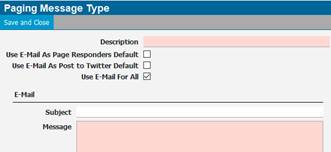
● Description – Name of the page
● Use as Default – Set as a default paging message from the command line. Navigate to System Admin > CAD > Commands to create a command that generates the default page. Select either the Page CFS or Page Units action in the command. Please reference the Commands section of the CAD configuration manual.
Note: When creating a CAD command to send a page, you can select which paging type to use in the command line
● Subject – Subject of the page
● Message – Details of the page
3. Use the available tags shown below in the Subject and Message Line to add more data about the CFS i.e., CFS number, CFS location, Incident Code, etc. When sending a page for a CFS, all the message tags {CFS_number} will be replaced by the corresponding data from the CFS.
Note: The dispatcher has the ability to edit this information on the paging message
