


Incident Codes describe the type of CFS and can provide defaulted information on the CFS. Incident codes are found on the CFS window.

1. Navigate to System Admin > CAD > Incident Codes. Already configured Incident Codes will display in the list and can be edited by double-clicking or deleted by highlighting blue and selecting Delete on the keyboard.
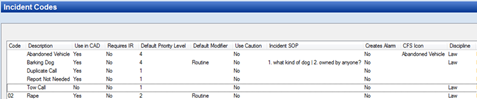
2. Select New Incident Code.
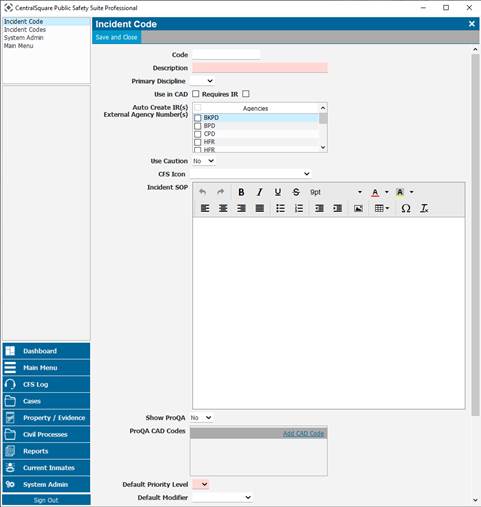
Code: Shows up before the description. Recommended to use this field because it will be easier for the dispatcher to search for the incident code on the CFS window.
Description: Incident Code name.
Primary Discipline: Select the applicable discipline.
Use in CAD: If checked then is available in CAD and cases. If not checked, then only available in cases.
Requires IR: If checked, then the CFS cannot be completed until an incident report has been assigned to a specific personnel.
All Agencies: If using Agency Specific Incident Codes checking this box will allow use for all agencies on the PS Pro Server.
Note: Contact CentralSquare Support to enable this feature.
Agencies using this Incident Code: Select from the dropdown of agencies that will be allowed to use this incident code.
Note: Contact CentralSquare Support to enable this feature.
Auto Create IR(s)/External Agency Number(s): If checked, then the system automatically creates a Case number (for system agencies) or an External Number (for non-system agencies, such as EMS) for the first unit from each agency when that unit is set to a specific status by the dispatcher.
Use Caution: Defaults on the CFS.
CFS Icon: Icon shows up on the CFS CAD Window.
Incident SOP: Standard operating procedure shows up on the SOP tab on the CFS.
Show ProQA:
ProQA CAD Codes:
Default Priority Level: Defaults can be changed by the dispatcher on the CFS.
Default Modifier: Defaults can be changed by the dispatcher on the CFS.
Modified Priority Levels: If the dispatcher changes the Modifier, then the priority level will change too.
Default How Reported: Defaults can be changed by the dispatcher on the CFS.
Create Alarm Record: Check to create an alarm record. Important if using the Alarm Billing feature.
Allow Posting CFS to Twitter: