


If you are interested in sending the report via fax, contact CentralSquare Technologies so the necessary global setting change can be made. 1000 faxes per month are included as part of standard maintenance; contact CentralSquare Technologies if you are interested in sending a higher volume of faxes.
Printers
If you wish to send the Rip and Run report to stations using printers that are accessible on your network then follow the steps below:
· System Admin > System > Printers
o Already configured printers display in the list and can be deleted by selecting delete on the keyboard
· Select New Printer
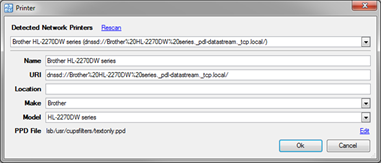
o Select Rescan to find the available network printers
o In the dropdown, select the desired printer
o Select Ok