


CFS Response Codes describe the type of response such as routine, urgent, under control, etc. The response codes are available on the Command Line and the CAD windows.

1. Navigate to System Admin > CAD > CFS Response Codes. Already configured CFS Response Codes will display in the list and can be edited by double-clicking or deleted by highlighting blue and selecting Delete on the keyboard.
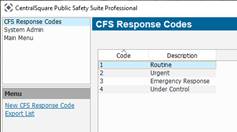
2. Select New CFS Response Code.
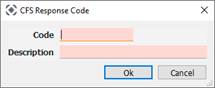
● Code: Shows up before the description.
● Description: Describes the response type.