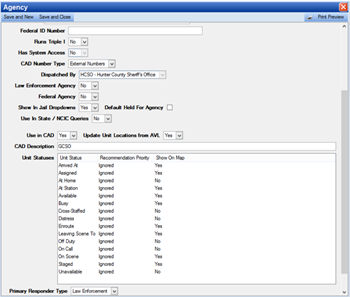
Prior to the configuration of the CAD System Admin items, go to System Admin > System > Agencies and select which agencies will be used in CAD.
Note: When printing a CFS it's possible to change the letterhead to that of an agency that responded to the CFS. Previously, it was only possible for the dispatch agency's letterhead to display.
1. Navigate to System Admin > Agencies and double-click to open an agency’s profile.
2. Select Yes or No in the Use in CAD field.

3. If yes, then provide a CAD Description.
● Unit Statuses will be configured if the agency uses Unit Recommendation.
4. Choose whether AVL (Responder GPS) will update the location of any responders attached to this agency.
● CAD Number Type: This will determine if a system agency will use IR Numbers (case reports within PS Pro Suite) or External Numbers.
Note: If External Numbers are being generated for more than one outside agency please contact Zuercher Support for specific configuration.
5. Select Yes for Shown on Map if you want the unit to display on the map when the unit has a specific status.
6. Select the Primary Responder Type such as Law Enforcement, Fire, Medical, etc.