


You can configure whether alarm billing is done on a calendar year basis, or whether each customer’s billing period lasts a specified number of days (e.g., 180) beginning with their first false alarm and then resets. You can also configure whether false alarms are set as Billable for persons, businesses, or both.
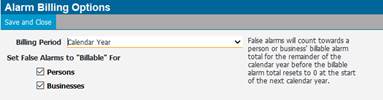
1. Navigate to System Admin > CAD > Alarm Billing Options.
Billing Period
● Calendar Year: False Alarms will count towards a person or business' billable alarm total for the remainder of the calendar year before the billable alarm total resets to 0 at the start of the next calendar year.
● Days From First Billable False Alarm: A person or business' first billable false alarm will start a billing period lasting as many days as indicated. At the end of this billing period, their billable alarm total resets to 0.
● Rolling Time Period: False alarms will count towards a person or business' billable alarm total for indicated time period before expiration (X number of days, weeks, or months).
2. Check persons and/or businesses if you want to bill them on false alarms.