1. Navigate to System Admin > Personnel > Personnel.
2. Double-click to edit a personnel record or select New Personnel to create a new record.
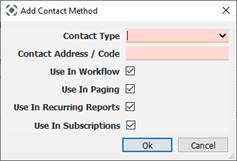
3. On the Demographics page, select Add Contact Method.

● Contact Type: Email Address, SMS Address or CAP Codes
• Agencies using a paging console interface can now specify CAP codes to send pages to pagers.
• Several contact types allow a person to receive pages by multiple methods.
● Contact Address/Code: Email Address, SMS address or Code
4. Select Use in Paging.